How to Use Find Γ
Find Γ reads a magnetic structure from its MCIF and works out its spin space symmetry and what that symmetry allows, following Spin Space Symmetry Without Spin Space Groups. Here is what a report says, what you can do with it, and where to click.
What the Report Says
A report describes a magnetic order by a few objects, each in a row of its own.
- Crystal Space Group (\(\boldsymbol{G_0}\))
- The structure's symmetry with its moments left out (the report's Crystal SG).
- Parent Space Group (\(\boldsymbol{G}\))
- The operations of \(G_0\) that keep the magnetic order, up to one transformation of spin space for all its moments. Where \(G = G_0\) the order is regular.
- Defining Representation (\(\boldsymbol{\Gamma}\))
- For each operation \(g\) of \(G\), the matrix \(\Gamma(g)\) that carries the moments, the spin space group's elements being \([\Gamma(g)\,\Vert\,g]\). It is one-, two- or three-dimensional for collinear, coplanar or non-coplanar order, \(\det\Gamma(g) = -1\) meaning time reversal with it, and is written as its irreducible parts (\(\Gamma = B_{2g}\)).
- Wavevectors (\(\boldsymbol{\vec{k}}\)) and Propagation Vectors (\(\boldsymbol{\vec{Q}}\))
- Γ's wavevector content, the stars of the wavevectors \(\vec{k}\) of its parts, in \(G\). The propagation vectors \(\vec{Q}\) are those the structure itself has weight on, in \(G_0\).
- Exterior Powers (\(\boldsymbol{\Lambda^1\Gamma}\), \(\boldsymbol{\Lambda^2\Gamma}\), \(\boldsymbol{\Lambda^3\Gamma}\))
- How a spin vector, a spin pseudovector and a spin pseudoscalar transform. \(\Lambda^1\Gamma = \Gamma\); \(\Lambda^2\Gamma\) is 0 for collinear order, \(\Lambda^3\Gamma\) unless it is non-coplanar.
- Allowed and Forbidden
- A response is allowed (✓) where the \(\vec{k} = \vec{0}\) part of its exterior power overlaps the multipole's representation beside it (its required overlap), and forbidden (✗) where it does not. A magnet is compensated where \(\Gamma\) holds no trivial irrep: no net magnetization.
- Magnet Classes
- An altermagnet is collinear and compensated, with a spin texture of even rank; an odd-parity magnet is compensated, with a spin texture of odd rank and none of even rank; a Luttinger compensated candidate is collinear, its magnetization allowed but its net moment below 0.01 μB. The wave (d, g, … or p, f, …) is the texture's lowest rank.
- Two Regimes
- Non-relativistic: spin and space transform apart, by the spin space group. Relativistic: spin–orbit coupling turns the moments with the crystal, and the magnetic space group takes the spin space group's place, written in the same way.
Analyse a Structure
Analyse a magnetic structure of your own, or open one that is already done.
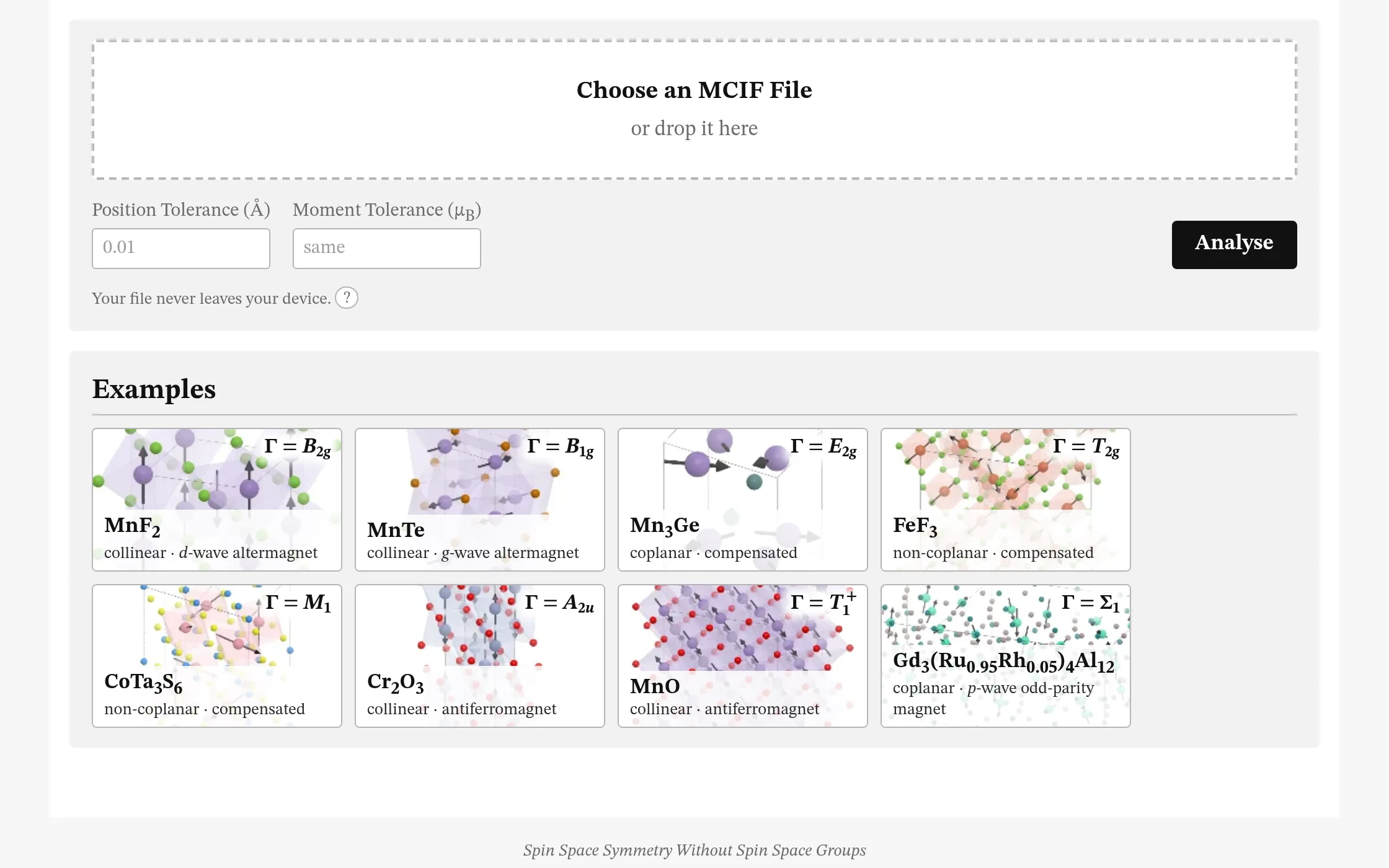
- 1 Choose an MCIF file, or drop one on the box.
- 2 Set the Position Tolerance (0.01 Å unless set) and the Moment Tolerance (the same number, in μB, unless set), then Analyse.
- 3 How It Works: what is done with the file, and by what.
- 4 Or open an example, from MnF2, an altermagnet, to the helix of Gd3(Ru0.95Rh0.05)4Al12.
- Your file is analysed in your browser and never uploaded. The first analysis downloads about 11 MB, kept for the next; an example, unchanged, opens its report at once.
The Report
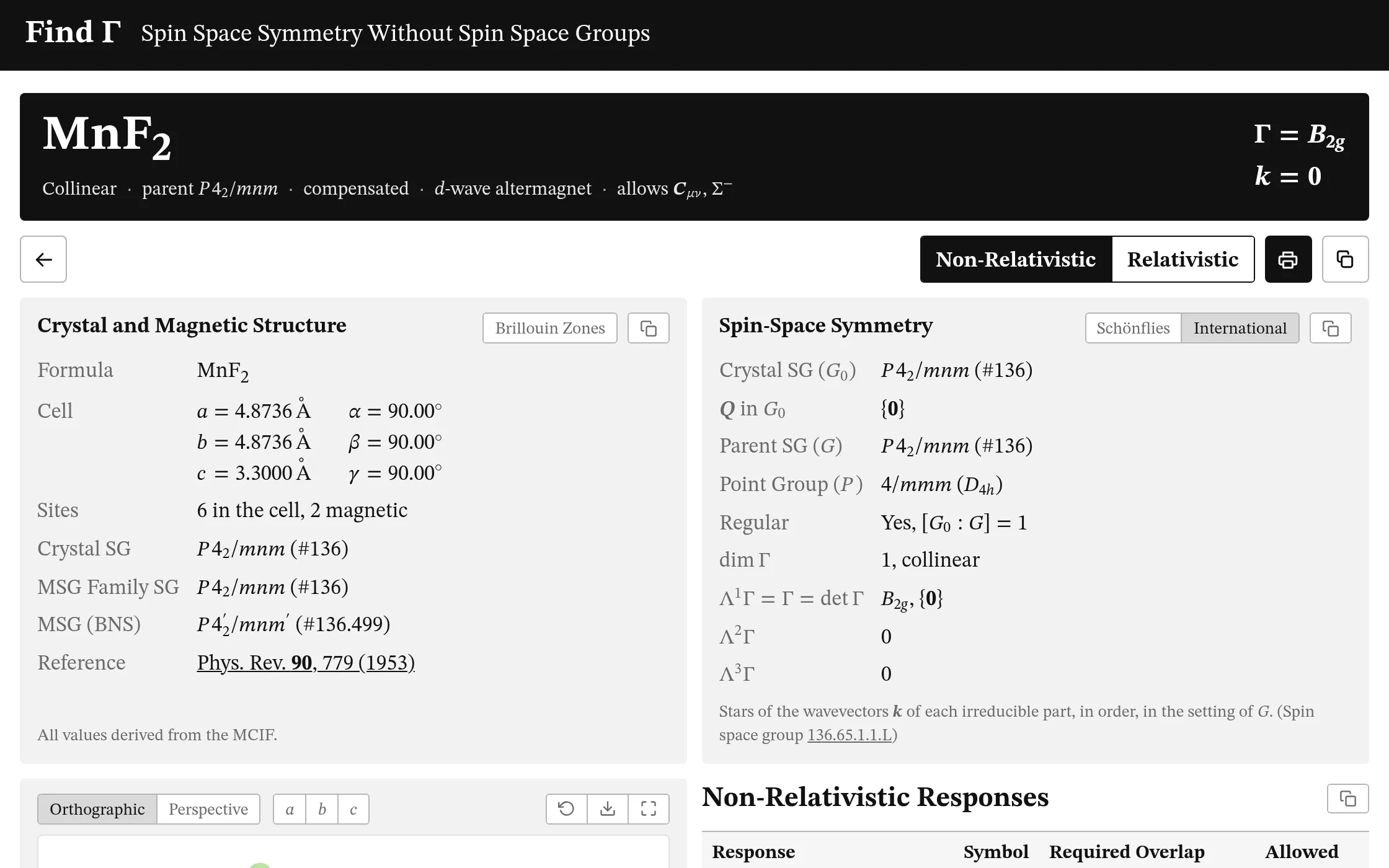
A report opens with what the order is and what it allows, the structure as the file gives it, and its symmetry.
- 1 The banner: the order, its parent group, whether it is compensated, its class, and what it allows; Γ and \(\vec{k}\) at its right.
- 2 Switch between the non-relativistic and the relativistic analysis, where there is one: the banner's Γ and \(\vec{k}\), the symmetry, the responses and the rest follow.
- 3 Print the report, or copy it all as plain text.
- 4 Write the operations as International Tables does, or in Schönflies's notation; your choice is kept.
- 5 Turn the structure's panel over to its Brillouin zones.
- Each section copies its own text; Multipoles, Representation, Sites and Verification fold.
- Verification compares the result with independent checks, and says where it depends on the tolerance or the file was corrected; Notes gives the conventions.
Structure
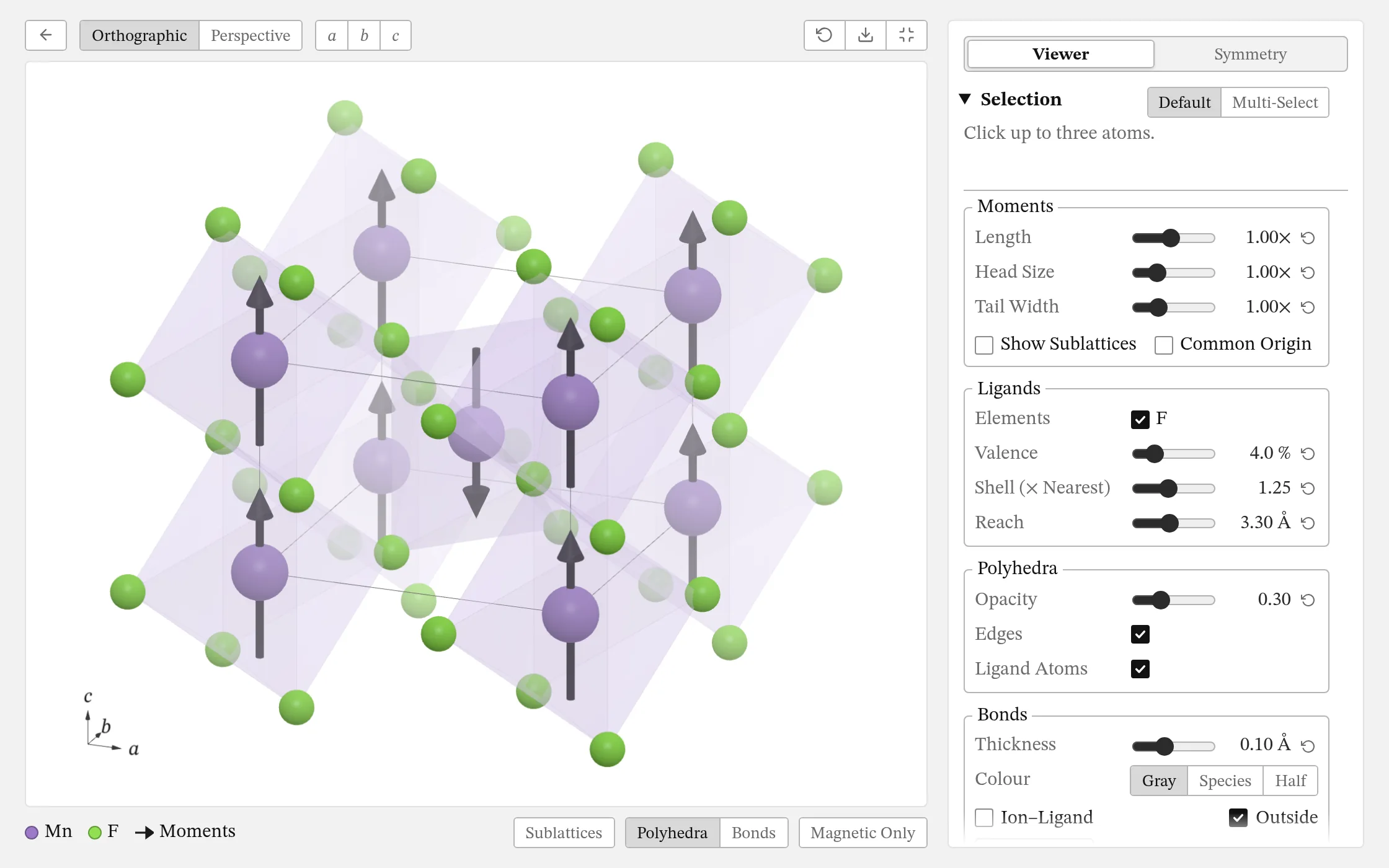
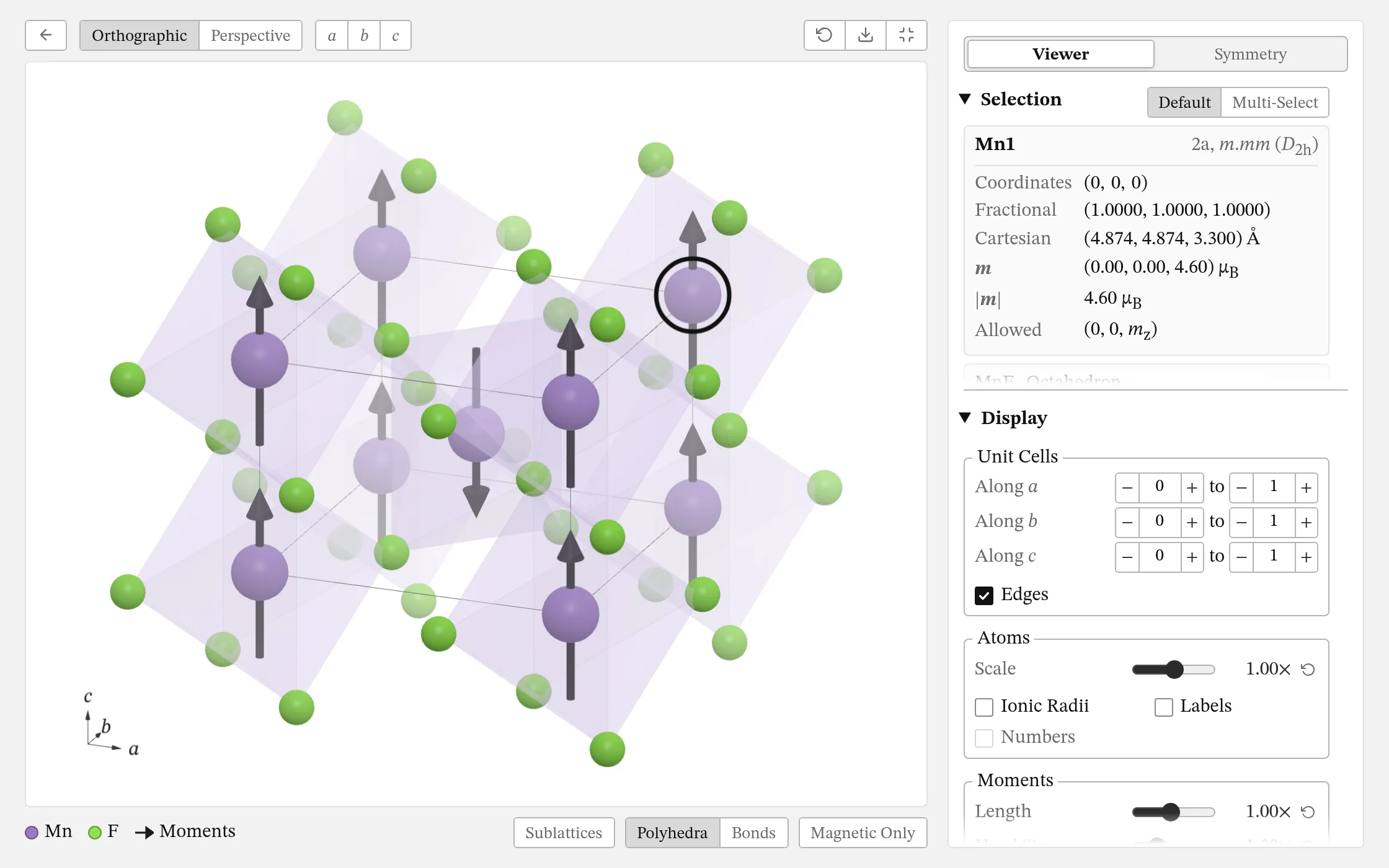
The cell is drawn with its moments and its magnetic ions' polyhedra; fill the window for the sidebar.
- 1 Drag to turn it, right-drag to move it, and scroll to zoom. On a phone, one finger turns it and two zoom.
- 2 Choose an orthographic or perspective view, or look along a, b or c.
- 3 Reset the view, save it as a PNG, or fill the window.
- 4 Hover over an atom for its card, and click up to three. One gives its site, its moment, its polyhedron and \(\Gamma_\text{perm}\), its orbit's permutation representation; two, their distance, the polyhedra they share and their vector chirality; three, the angle between them and their scalar chirality.
- 5 Click a species to fade it, and again to hide it; Moments does the same to the arrows.
- 6 Colour the moments by sublattice, show the polyhedra or the bonds, draw a coplanar order's plane, or fade all but the magnetic ions.
- 7 The sidebar's Viewer and Symmetry pages.
- Click the Wyckoff label in an atom's card to show its orbit. With two atoms chosen, Show Orbit draws their bond's orbit, and + Add Bonds draws bonds of your own.
- With the pointer over the view: the arrows turn it, + and − zoom, a, b and c look along the axes, r resets it and f fills the window.
Symmetry
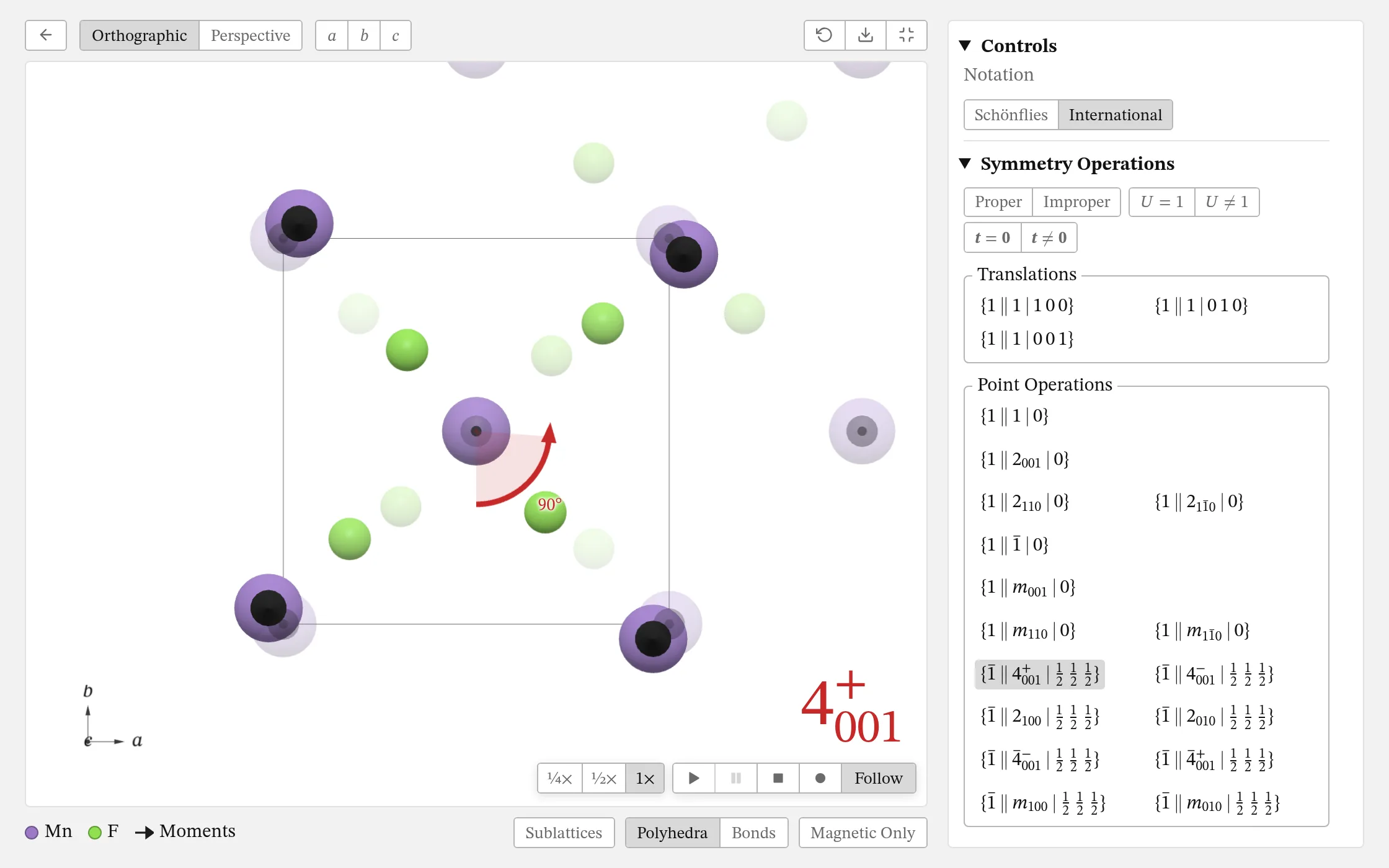
The Symmetry page lists the group's elements, each \(\{U\,\Vert\,R\,|\,\vec{t}\}\), and plays each one on the structure.
- 1 Narrow the list to the proper or improper operations, those with \(U = 1\) or not, and those with a translation or not.
- 2 Click an operation for its card, with \(U\) and Γ, and to play it: its rotation \(R\), its translation \(\vec{t}\), then its spin part \(U\), each in turn, its element in red and \(U\)'s in blue. Each moment then flashes green where it lands on the structure's, red where not. A rotoinversion plays as a rotation, then a reflection.
- 3 Rest the pointer on an operation to see its element without playing it.
- 4 Slow it to ¼× or ½×, pause it, or stop it.
- 5 Follow turns the camera to each part as it plays.
- 6 Record an operation, or all of them, as a film: MP4, GIF or WebP.
- Click an atom for its site's own operations, or two for their bond's: those that fix its ends and those that swap them, with the bond's midpoint and orbit.
- In the relativistic analysis, the list is the magnetic space group's.
Responses
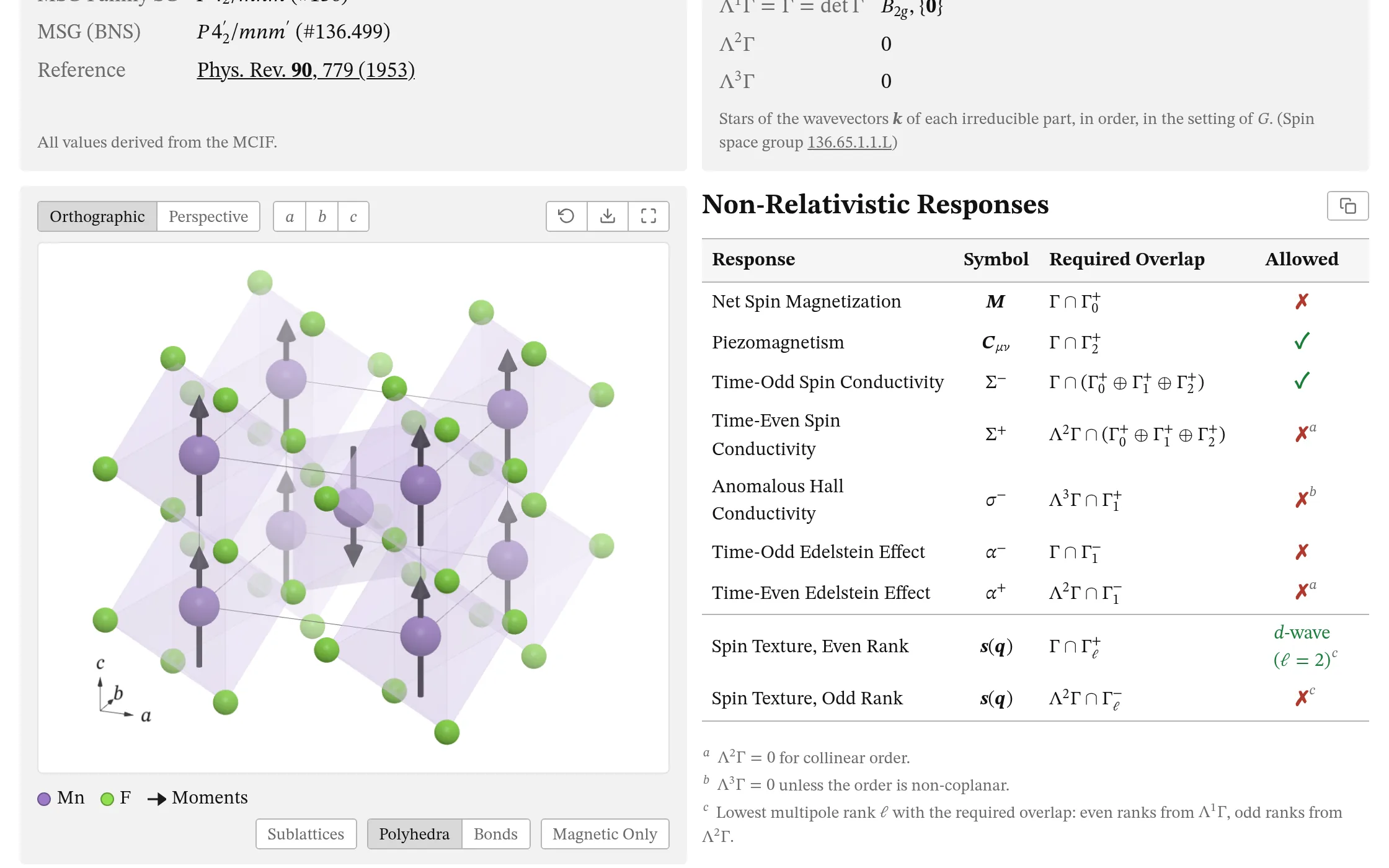
Which responses the symmetry allows, each with the overlap that decides it.
- 1 Each response, from the net spin magnetization to the Edelstein effects, with its symbol.
- 2 Its required overlap: an exterior power of Γ with a multipole's representation.
- 3 ✓ allowed, ✗ forbidden; a note says why where the order's dimension decides it.
- 4 The spin textures of even and odd rank, with the wave of each.
- 5 Copy the table as text.
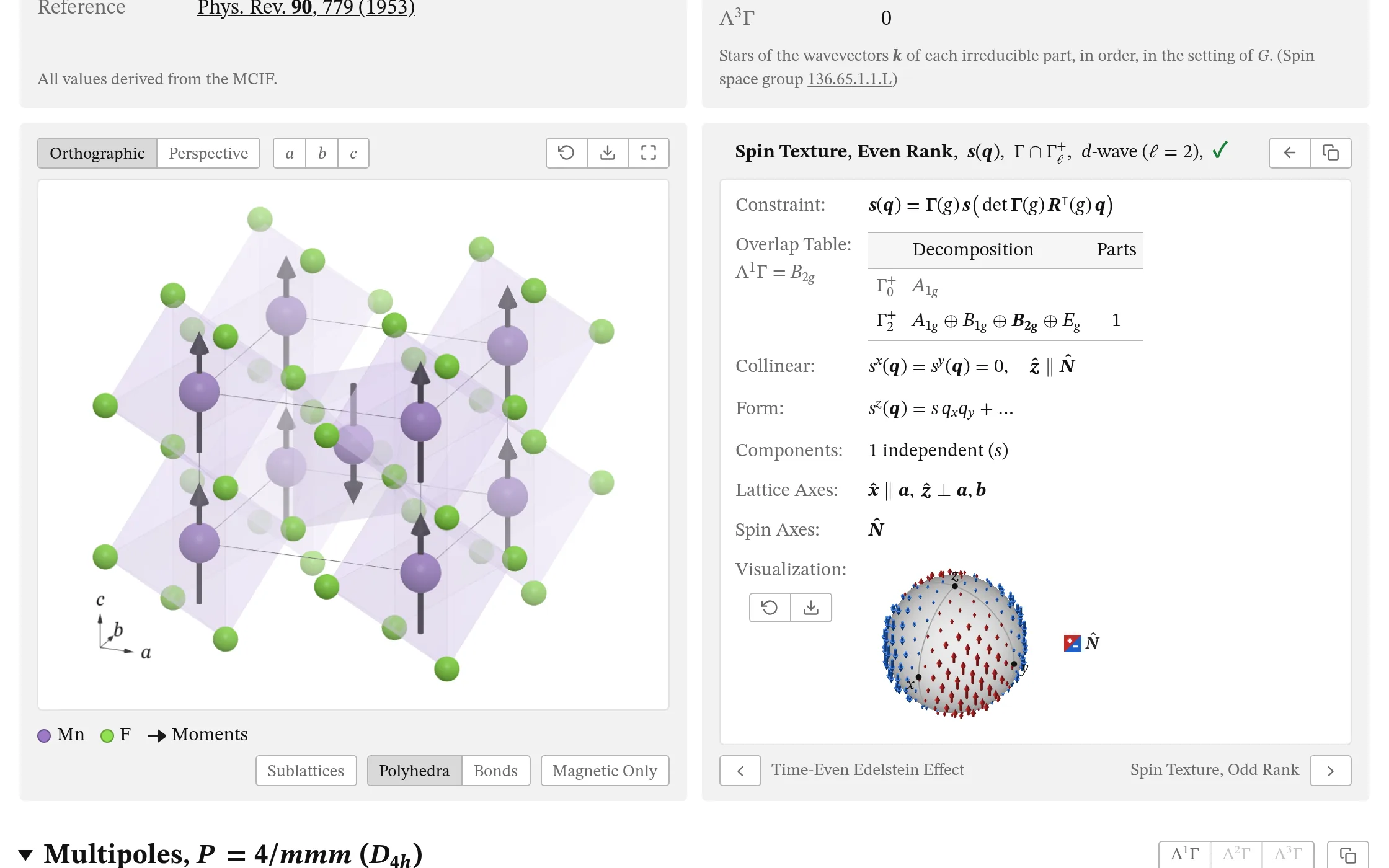
- 6 Click a row for its details, and the arrow (or Escape) to go back. The address keeps it, so a link opens the same details.
- 7 The overlap table: the power's parts and the multipole's, those at \(\vec{k} \neq \vec{0}\) in grey.
- 8 For a spin texture, a sphere of \(\vec{q}\) for each form; drag to turn it.
- 9 The previous and next responses.
- 10 Copy it as text, its equations also in LaTeX.
- Each gives its definition and constraint, the form it takes, its independent components, and the lattice and spin axes they are written in.
Representation
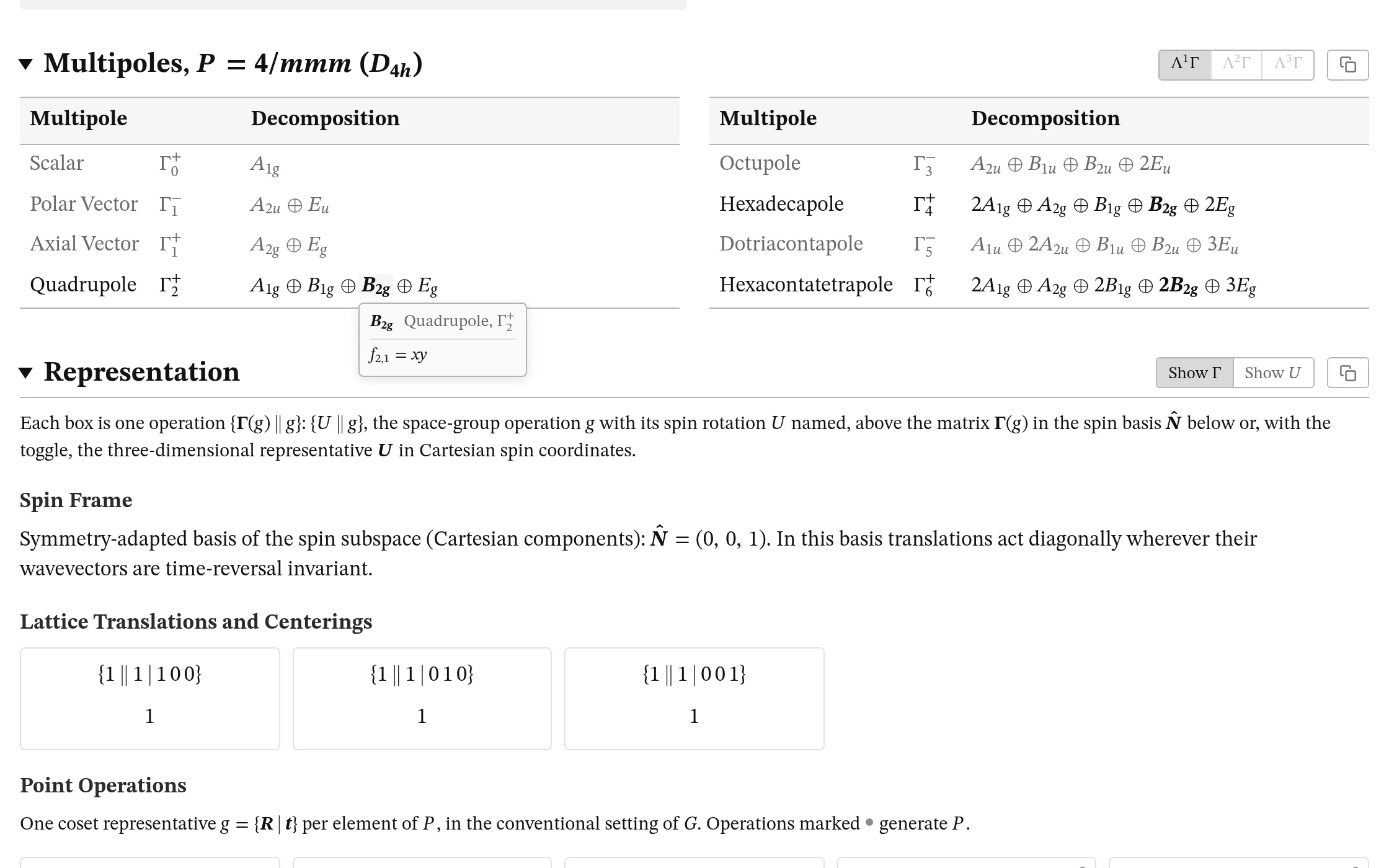
How the point group's multipoles decompose, and Γ itself, operation by operation.
- 1 Highlight the irreps of \(\Lambda^1\Gamma\), \(\Lambda^2\Gamma\) or \(\Lambda^3\Gamma\).
- 2 Hover over an irrep, or tap it, for the functions that transform as it; click it to copy them.
- 3 Each operation of the point group with its matrix \(\Gamma(g)\) in the spin frame \(\hat{N}\), the lattice translations' too; the generators are marked.
- 4 Show Γ, or \(U\), the three-dimensional matrix in Cartesian spin coordinates.
Brillouin Zones
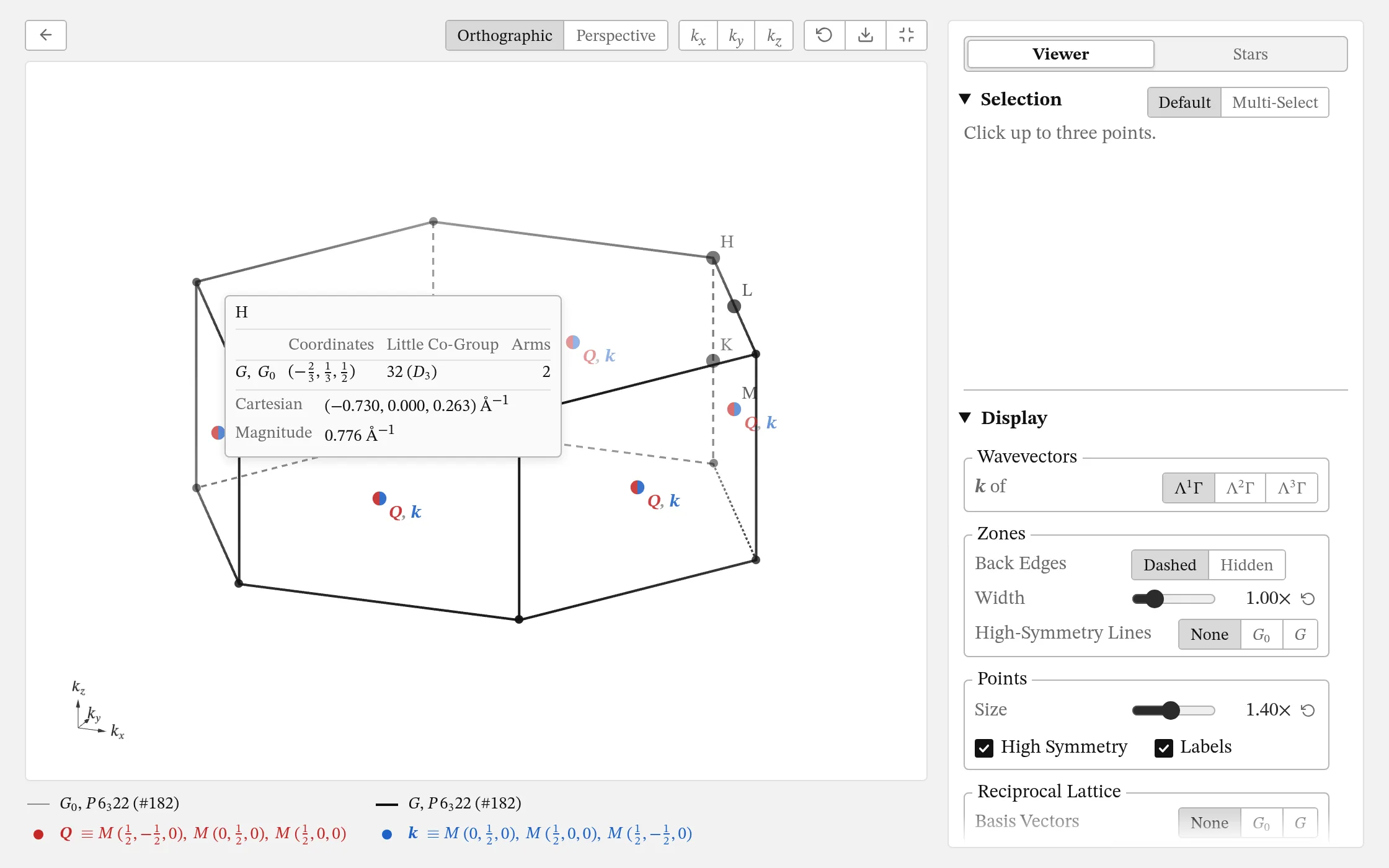
Where the wavevectors are: the zones of \(G_0\) and \(G\), their points of symmetry, and the stars of \(\vec{Q}\) and \(\vec{k}\). Turn the structure's panel over to them (where \(\vec{Q}\) or \(\vec{k}\) is not 0).
- 1 The key: \(G_0\)'s zone in grey and \(G\)'s in black, the stars of \(\vec{Q}\) in red and of \(\vec{k}\) in blue. Click an entry to hide it or show it again.
- 2 Hover over a point, or tap it, for its card: its coordinates in each group, its little co-group and the arms of its star.
- 3 The sidebar: Selection shows a point's star or looks along it, and the Stars page lists every star.
- 4 Choose an orthographic or perspective view, or look along \(k_x\), \(k_y\) or \(k_z\); reset it, or save it as a PNG.
- 5 Display: the high-symmetry lines, the reciprocal lattice's basis vectors and neighbouring zones, and Bragg peaks for X-rays or neutrons.
- Drag to turn the zones, and scroll or pinch to zoom; click points for their distances and angles.
Display
How the structure is drawn: the sidebar's Display, View, Export Image and Settings.
- 1 Moments: their length, head and tail; colours by sublattice, a common origin, or equal lengths.
- 2 Ligands: which elements, and the rule that finds them: bond valence (Valence), else a shell about the nearest (Shell), within Reach.
- 3 Polyhedra: their opacity, which ions have them, their edges, and the ligands' atoms.
- 4 Bonds: their thickness and colour; + Add Bonds for any two species within a range of distances.
- Unit Cells: how many along a, b and c, fractions allowed. Atoms: their size, ionic radii, and labels.
- View: look along [uvw] or normal to (hkl), turn by 15°, or look along a direction of the crystal's symmetry. Export Image: at 1×, 2× or 4×, on no background, white or grey.
- Settings: Save as Default keeps your display for every page in this browser; Reset All Settings goes back.